# IPv6网络优化

## IPv6网络配置全指南

### 一、IPv6网络发展现状

1. ​**国内IPv6升级进程**
   * 运营商骨干网/城域网、云服务商、终端设备厂商全面支持IPv6
   * 当前运营商提供的IPv6线路类型：
     * 支持前缀授权（路由模式）
     * 不支持前缀授权（桥接模式）
2. ​**两种IPv6模式对比**

   | 模式类型    | 地址分配方式    | 网络架构要求         | 推荐程度  |
   | ------- | --------- | -------------- | ----- |
   | 支持前缀授权  | 用户自主分配地址  | 支持IPv6路由模式的路由器 | ★★★★☆ |
   | 不支持前缀授权 | 运营商直接分配地址 | 支持IPv6桥接模式的路由器 | ★★★☆☆ |

### 二、IPv6连通性排查流程

**基础检查步骤**

* [ ] &#x20;光猫/路由器已开启IPv6功能
* [ ] &#x20;防火墙处于关闭状态
* [ ] &#x20;获取的IPv6地址非`fe08`开头（内网地址无效）
* [ ] &#x20;优先使用设备直连拨号测试

### 三、附各型号光猫IPv6优化[​](https://help.niulinkcloud.com/smallbox/smallnethelp/ipv6_optimize.html#%E9%99%84%E5%BD%951-%E5%90%84%E5%9E%8B%E5%8F%B7%E5%85%89%E7%8C%ABipv6%E4%BC%98%E5%8C%96) <a href="#fu-lu-1-ge-xing-hao-guang-mao-ipv6-you-hua" id="fu-lu-1-ge-xing-hao-guang-mao-ipv6-you-hua"></a>

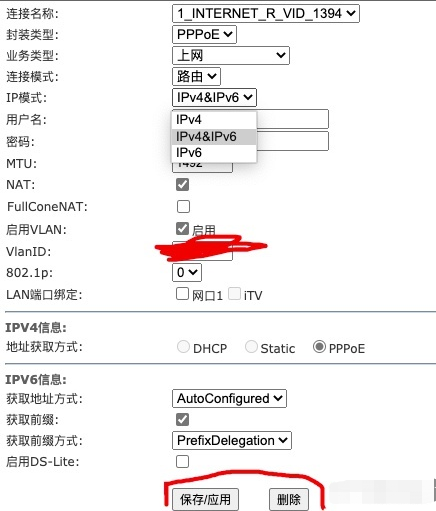
#### **移动光猫HG6543C5**[​](https://help.niulinkcloud.com/smallbox/smallnethelp/ipv6_optimize.html#%E7%A7%BB%E5%8A%A8%E5%85%89%E7%8C%ABhg6543c5) <a href="#yi-dong-guang-mao-hg6543c5" id="yi-dong-guang-mao-hg6543c5"></a>

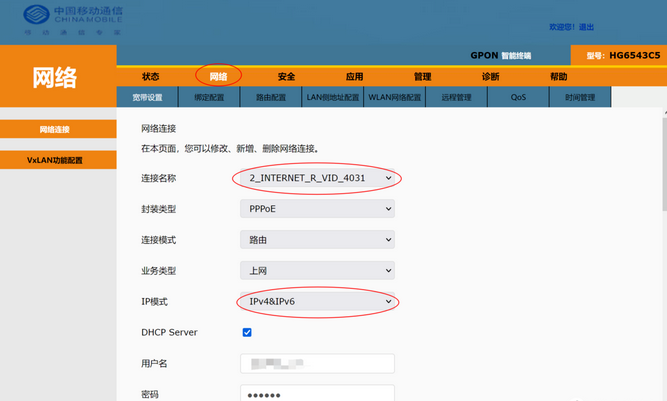
网络——宽带设置——IP模式选IPv4\&IPv6

<div align="left"><img src="https://help.niulinkcloud.cn/img/smallbox/ipv6/%E5%9B%BE%E7%89%871_1705910261199.png" alt=""></div>

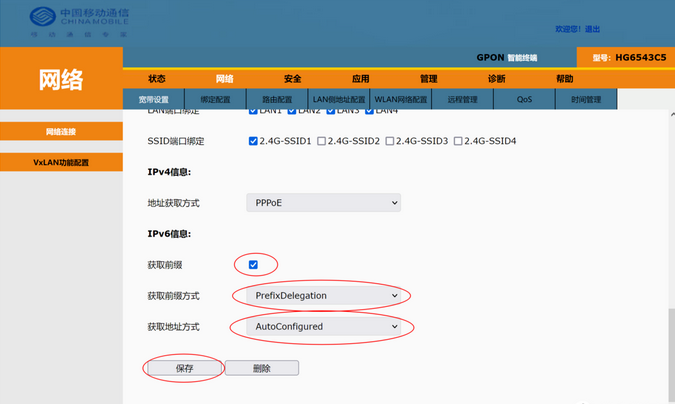
IPv6信息按照图中所示调整

<div align="left"><img src="https://help.niulinkcloud.cn/img/smallbox/ipv6/%E5%9B%BE%E7%89%872_1705910347511.png" alt=""></div>

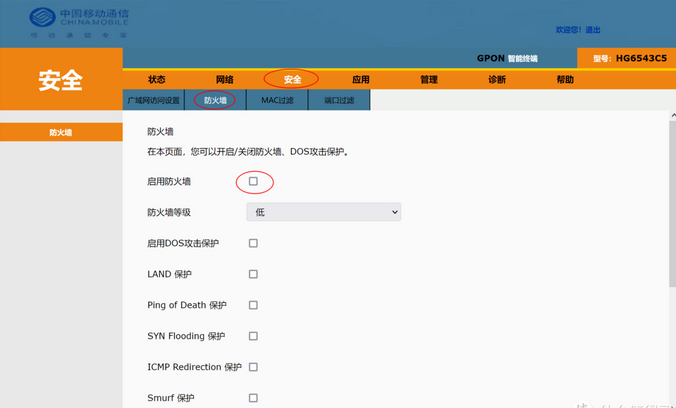
PS：如果光猫有防火墙，请关闭防火墙或调整防火墙等级到最低的级别

<div align="left"><img src="https://help.niulinkcloud.cn/img/smallbox/ipv6/%E5%9B%BE%E7%89%873_1705910385205.png" alt=""></div>

拨号成功后即可看到WAN口获取到IPv6地址

PS：配置IPv6完成后可能要重启盒子的网络服务，或者直接重启盒子以重新获取一下IP

#### **移动家庭网关H3-2s**[​](https://help.niulinkcloud.com/smallbox/smallnethelp/ipv6_optimize.html#%E7%A7%BB%E5%8A%A8%E5%AE%B6%E5%BA%AD%E7%BD%91%E5%85%B3h3-2s) <a href="#yi-dong-jia-ting-wang-guan-h32s" id="yi-dong-jia-ting-wang-guan-h32s"></a>

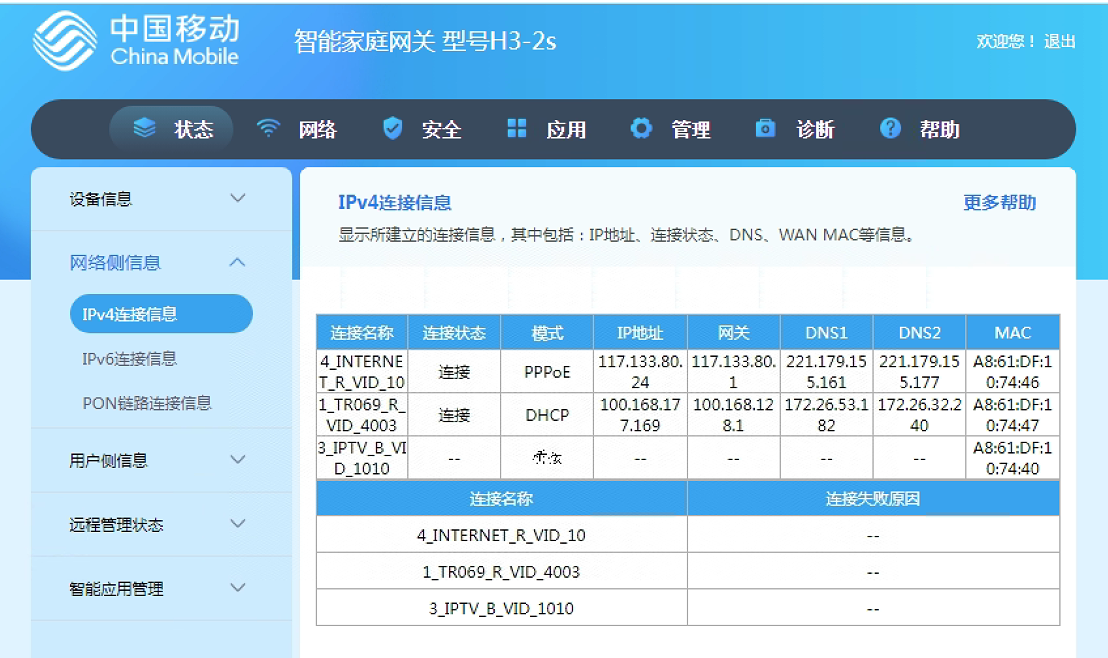
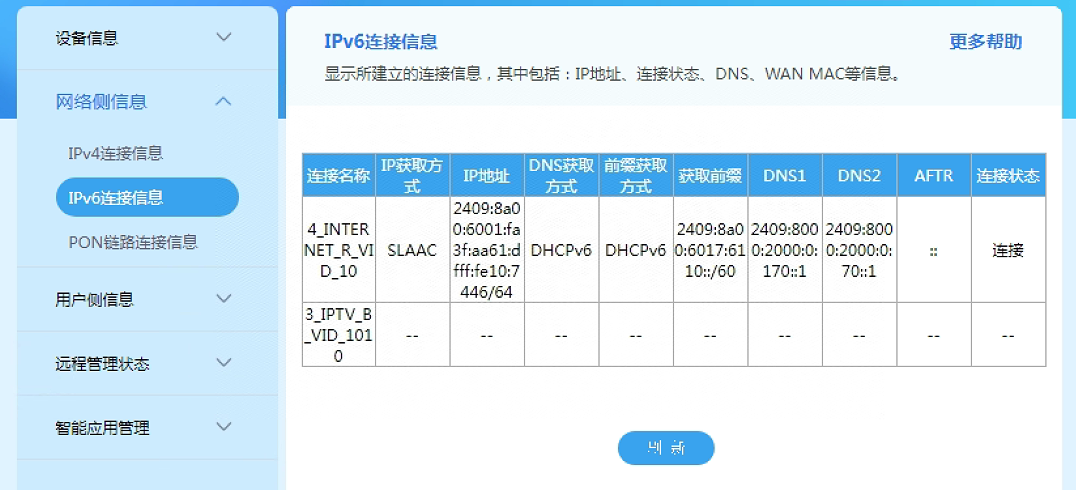
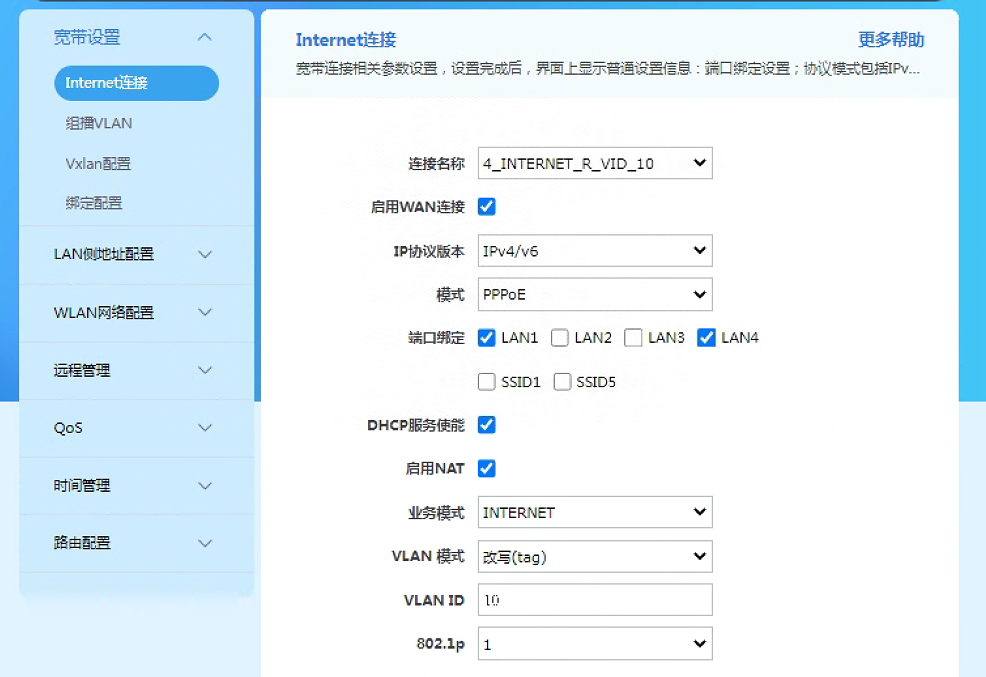
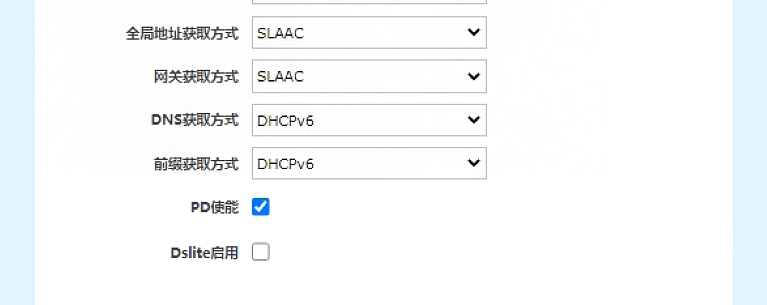
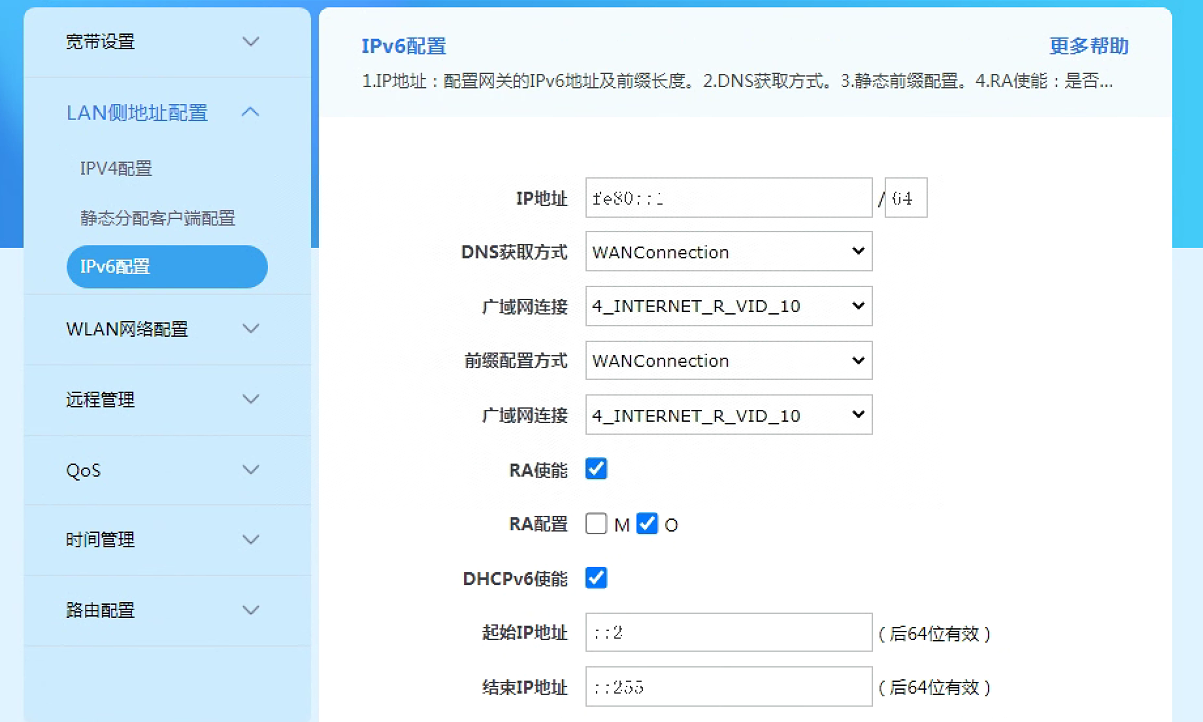
参考如下配置

<div align="left"><img src="https://help.niulinkcloud.cn/img/smallbox/ipv6/%E5%9B%BE%E7%89%874_1705910612472.png" alt=""></div>

<div align="left"><img src="https://help.niulinkcloud.cn/img/smallbox/ipv6/%E5%9B%BE%E7%89%875_1705910640493.png" alt=""></div>

实例设备**LAN4为跑量设备，设置端口绑定**

<div align="left"><img src="https://help.niulinkcloud.cn/img/smallbox/ipv6/%E5%9B%BE%E7%89%876_1705910650238.png" alt=""></div>

<div align="left"><img src="https://help.niulinkcloud.cn/img/smallbox/ipv6/%E5%9B%BE%E7%89%877_1705910721309.png" alt=""></div>

<div align="left"><img src="https://help.niulinkcloud.cn/img/smallbox/ipv6/%E5%9B%BE%E7%89%878_1705910793762.png" alt=""></div>

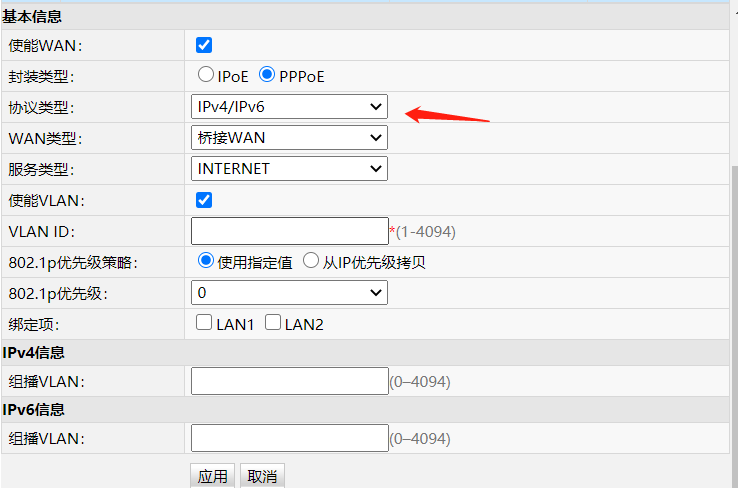
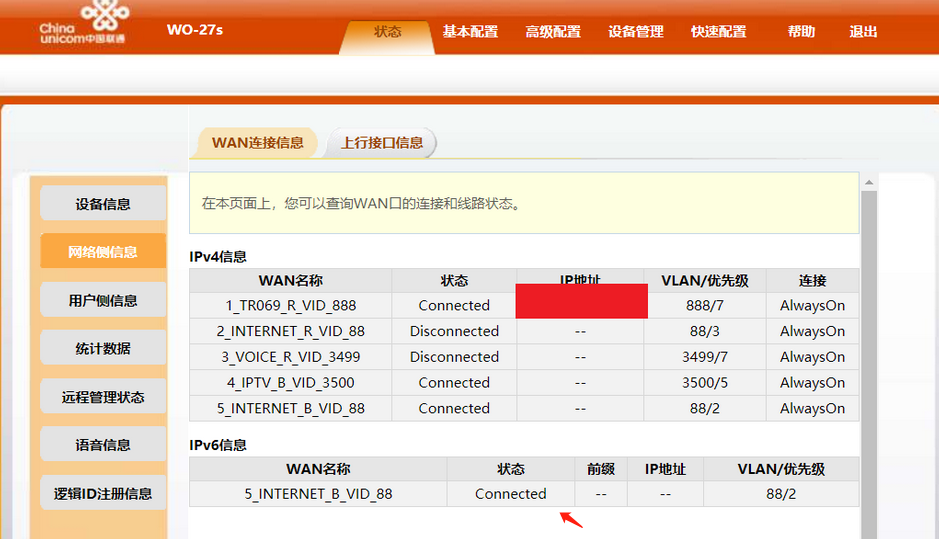
#### **联通光猫wo-27S**[​](https://help.niulinkcloud.com/smallbox/smallnethelp/ipv6_optimize.html#%E8%81%94%E9%80%9A%E5%85%89%E7%8C%ABwo-27s) <a href="#lian-tong-guang-mao-wo27s" id="lian-tong-guang-mao-wo27s"></a>

参考如下配置

<div align="left"><img src="https://help.niulinkcloud.cn/img/smallbox/ipv6/%E5%9B%BE%E7%89%879_1705910866847.png" alt=""></div>

配置完成后会产生IPv6连接信息

**注意：如果光猫有防火墙，需要关闭 或 调整光猫防火墙阈值至最低！**

<div align="left"><img src="https://help.niulinkcloud.cn/img/smallbox/ipv6/%E5%9B%BE%E7%89%8710_1705910894390.png" alt=""></div>

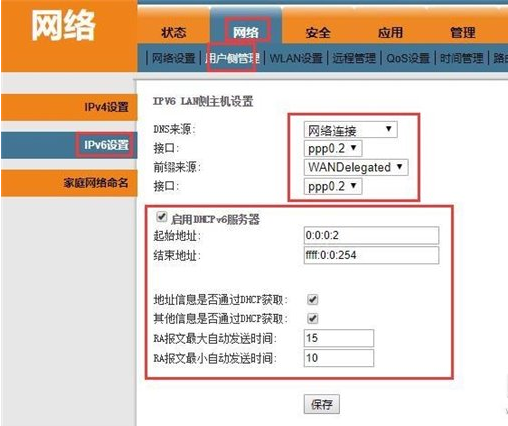
#### **电信光猫TEWA-600AGM**[​](https://help.niulinkcloud.com/smallbox/smallnethelp/ipv6_optimize.html#%E7%94%B5%E4%BF%A1%E5%85%89%E7%8C%ABtewa-600agm) <a href="#dian-xin-guang-mao-tewa600agm" id="dian-xin-guang-mao-tewa600agm"></a>

参考如下配置

1. IP模式需要勾选"IPv4\&IPv6"，不能只勾选"IPv6"，不是所有网站都支持IPv6。否则会出现某些不支持IPv6网站打不开的情况；
2. 如果有分配VlanID，需务必输入，否则可能会出现无法拨号等问题；

<div align="left"><img src="https://help.niulinkcloud.cn/img/smallbox/ipv6/%E5%9B%BE%E7%89%8711_1705911066719.png" alt=""></div>

1. 切换页面【网络】-->【用户侧管理】-->【IPv6设置】，需参考选择对应的接口名称，与勾选"启用DHCPv6服务器"并保存

<div align="left"><img src="https://help.niulinkcloud.cn/img/smallbox/ipv6/%E5%9B%BE%E7%89%8712_1705911162031.png" alt=""></div>

**注意：如果光猫有防火墙，需要关闭 或 调整光猫防火墙阈值至最低！**

#### **天翼网关-EPON HN8145X6**[​](https://help.niulinkcloud.com/smallbox/smallnethelp/ipv6_optimize.html#%E5%A4%A9%E7%BF%BC%E7%BD%91%E5%85%B3-epon-hn8145x6) <a href="#tian-yi-wang-guan-eponhn8145x6" id="tian-yi-wang-guan-eponhn8145x6"></a>

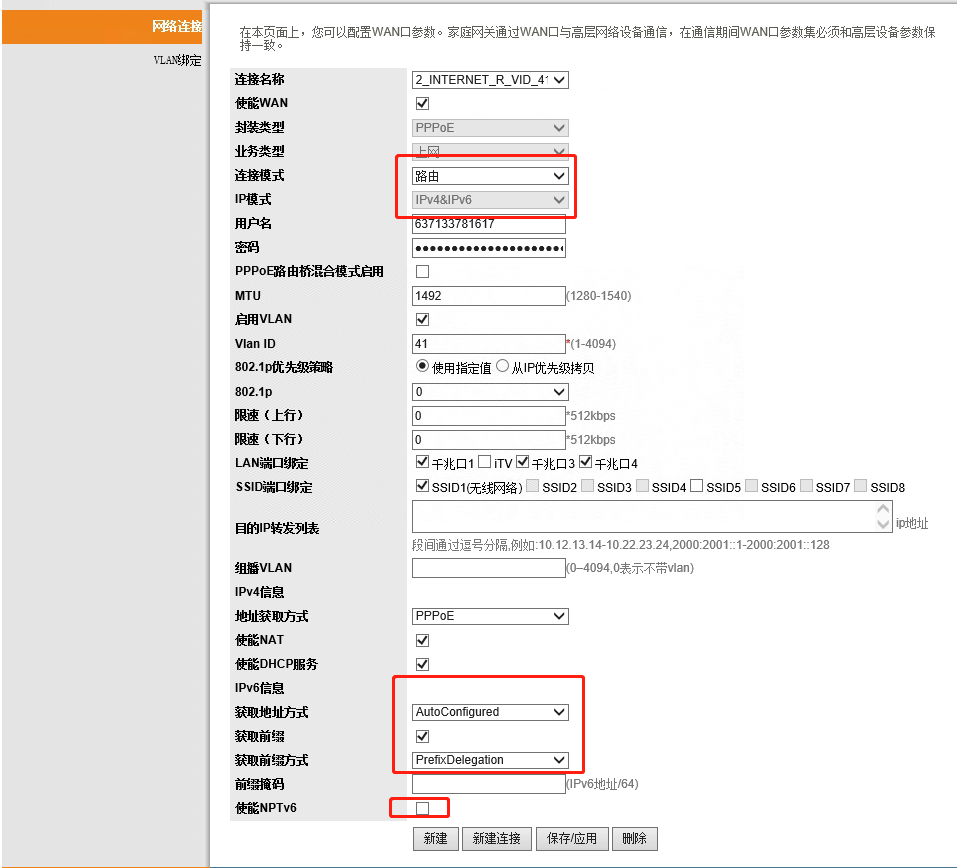
参考如下配置

<div align="left"><img src="https://help.niulinkcloud.cn/img/smallbox/ipv6/%E5%9B%BE%E7%89%8713_1705911245143.png" alt=""></div>

不用使能NPTv6

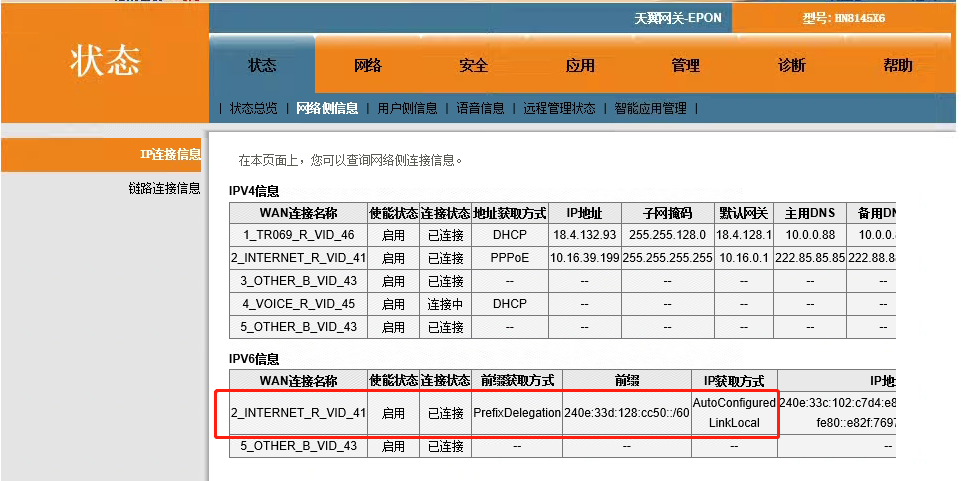
<div align="left"><img src="https://help.niulinkcloud.cn/img/smallbox/ipv6/%E5%9B%BE%E7%89%8714_1705911274282.png" alt=""></div>

连接状态为已连接

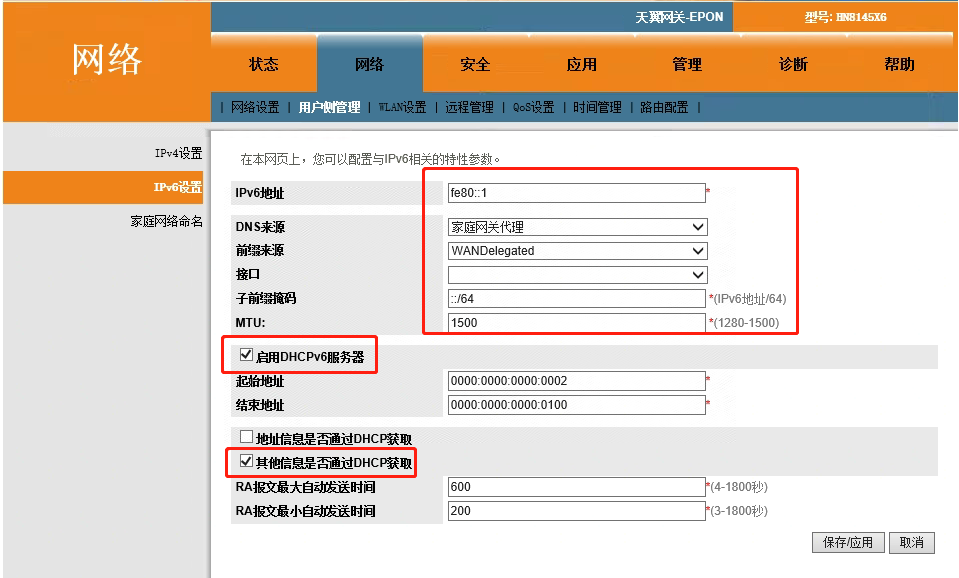
<div align="left"><img src="https://help.niulinkcloud.cn/img/smallbox/ipv6/%E5%9B%BE%E7%89%8715_1705911311129.png" alt=""></div>

DNS来源可以使用家庭网关代理

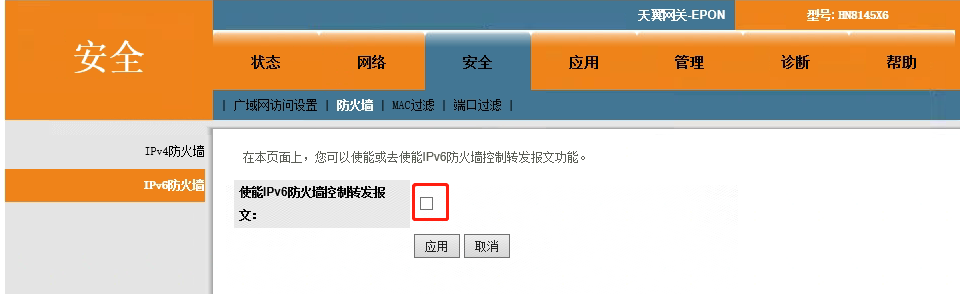
<div align="left"><img src="https://help.niulinkcloud.cn/img/smallbox/ipv6/%E5%9B%BE%E7%89%8716_1705911347255.png" alt=""></div>

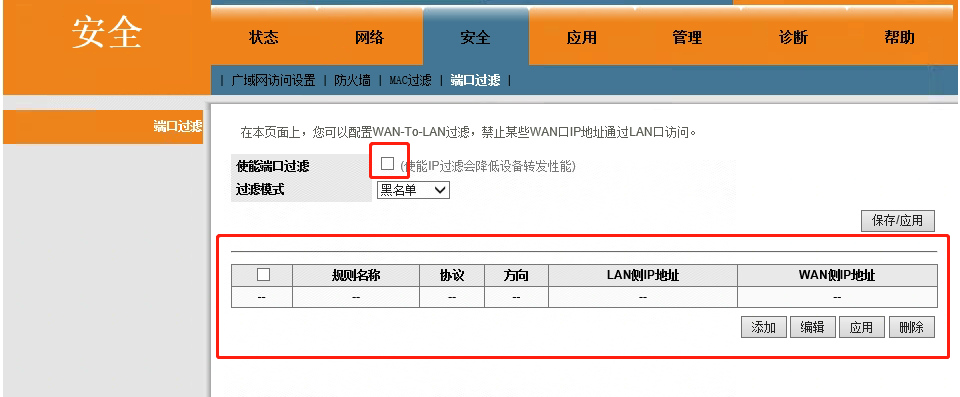
不要打开使能，否则需要手动控制转发，导致ipv6无法被外网访问

<div align="left"><img src="https://help.niulinkcloud.cn/img/smallbox/ipv6/%E5%9B%BE%E7%89%8717_1705911373184.png" alt=""></div>

端口过滤不用设置。


---

# Agent Instructions: Querying This Documentation

If you need additional information that is not directly available in this page, you can query the documentation dynamically by asking a question.

Perform an HTTP GET request on the current page URL with the `ask` query parameter:

```
GET https://help.titanapp.info/titan-network-zhong-wen/4-ce-jia-li-le-ce-shi-wang/wang-luo-pei-zhi-you-hua/zhong-guo-qu-yu/ipv6-wang-luo-you-hua.md?ask=<question>
```

The question should be specific, self-contained, and written in natural language.
The response will contain a direct answer to the question and relevant excerpts and sources from the documentation.

Use this mechanism when the answer is not explicitly present in the current page, you need clarification or additional context, or you want to retrieve related documentation sections.