> For the complete documentation index, see [llms.txt](https://help.titanapp.info/llms.txt). Markdown versions of documentation pages are available by appending `.md` to page URLs; this page is available as [Markdown](https://help.titanapp.info/titan-network-zhong-wen/4-ce-jia-li-le-ce-shi-wang/zhi-ya-tnt4-dai-bi-jiao-cheng.md).
# 质押 TNT4 代币教程
### TNT4 代币的质押流程如下:
1. 连接钱包:
* 打开浏览器,访问 [Titan Network 质押页面](https://test4.titannet.io/Stake)。
* 点击“钱包登录”按钮 ,并按照提示授权连接。
2. 填写质押金额:
 * 在界面中点击“质押”选项卡。
* 输入您想要质押的 TNT4 数量,质押数量不可大于账户中的可用余额。
* 交易费用通常以 TTNT 支付,具体金额取决于网络状况。
3. 确认并提交交易:
* 点击“质押”提交按钮,Keplr 钱包会弹出授权请求。
* 确认交易后,等待网络确认,质押完成。
* 质押完成后,下方的“质押记录”将会出现质押完成的记录
### 取回质押代币的流程如下:
取回质押分两步,涉及 5 天锁定期。
1. 发起解除绑定,进入等待锁定期:
* 在界面中点击“质押”选项卡。
* 输入您想要质押的 TNT4 数量,质押数量不可大于账户中的可用余额。
* 交易费用通常以 TTNT 支付,具体金额取决于网络状况。
3. 确认并提交交易:
* 点击“质押”提交按钮,Keplr 钱包会弹出授权请求。
* 确认交易后,等待网络确认,质押完成。
* 质押完成后,下方的“质押记录”将会出现质押完成的记录
### 取回质押代币的流程如下:
取回质押分两步,涉及 5 天锁定期。
1. 发起解除绑定,进入等待锁定期:
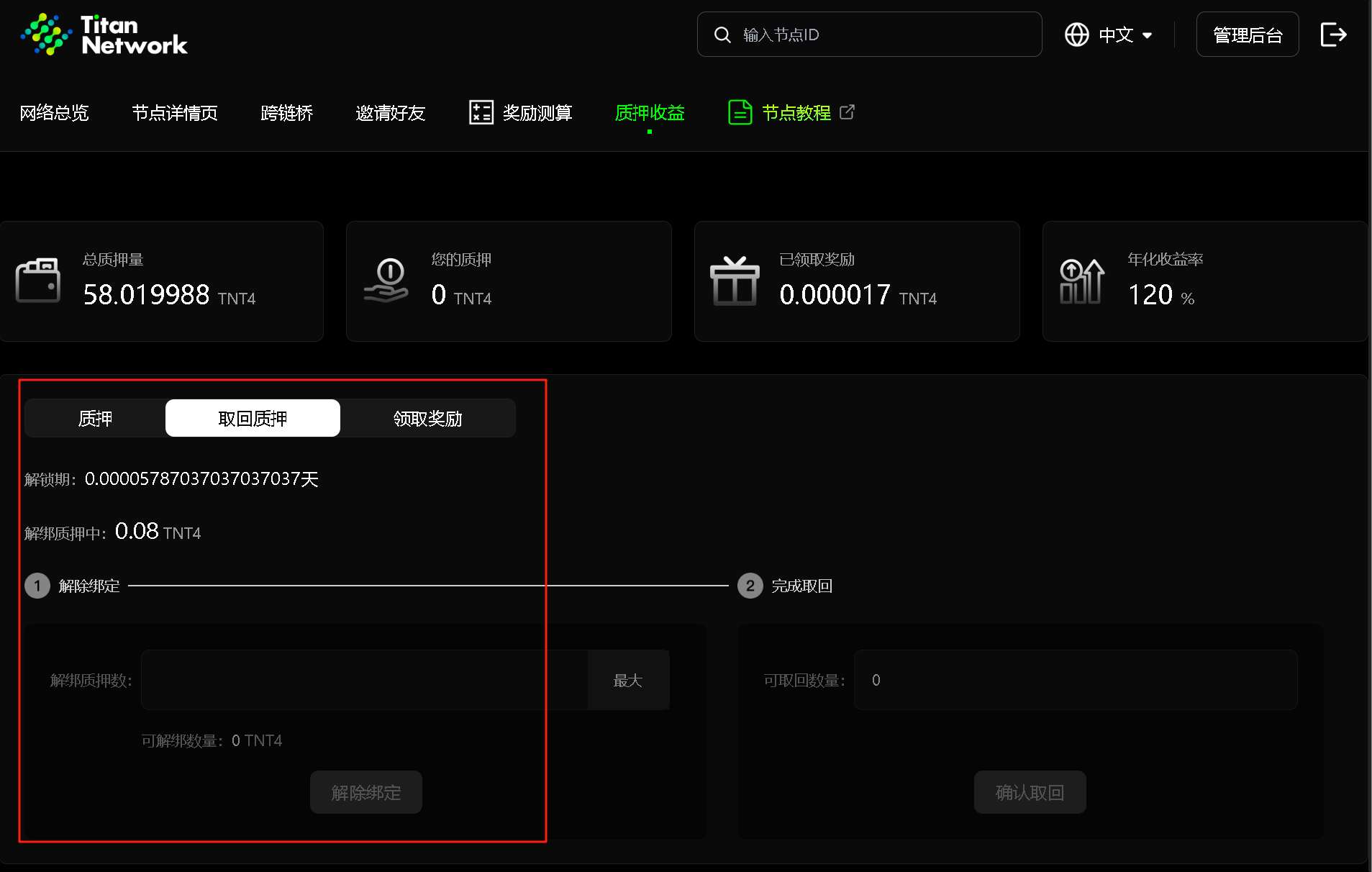 * 在界面中点击“取回质押”选项卡,输入您要取回的金额。
* 点击“解除绑定”按钮,确认交易详情后,在 Keplr 钱包中授权。
* 此时,代币进入 5 天锁定期,期间不可转移或再次质押。
* 可通过仪表盘查看锁定状态,期间取回记录中会显示为“锁定至 XXX”的状态。
2. 确认取回:
* 在界面中点击“取回质押”选项卡,输入您要取回的金额。
* 点击“解除绑定”按钮,确认交易详情后,在 Keplr 钱包中授权。
* 此时,代币进入 5 天锁定期,期间不可转移或再次质押。
* 可通过仪表盘查看锁定状态,期间取回记录中会显示为“锁定至 XXX”的状态。
2. 确认取回:
 * 锁定期结束后,返回质押仪表盘。
* 点击“确认取回”,在 Keplr 钱包中授权,网络确认后,代币将返回您的钱包余额。
### 领取质押奖励流程如下:
* 锁定期结束后,返回质押仪表盘。
* 点击“确认取回”,在 Keplr 钱包中授权,网络确认后,代币将返回您的钱包余额。
### 领取质押奖励流程如下:
 1. 查看预计可领取奖励:
* 在界面中点击“领取奖励”选项卡。
* 奖励金额每日更新,基于您的质押量和验证者的表现计算。
2. 领取奖励:
* 点击“领取奖励”按钮,系统会发起交易。
* 在 Keplr 钱包中授权确认,交易完成后,奖励将转入您的钱包余额。
额外注意事项
* 交易费用:每次质押、取回或领取奖励均需支付少量 TTNT 作为网络费用,确保 TTNT 余额充足。
1. 查看预计可领取奖励:
* 在界面中点击“领取奖励”选项卡。
* 奖励金额每日更新,基于您的质押量和验证者的表现计算。
2. 领取奖励:
* 点击“领取奖励”按钮,系统会发起交易。
* 在 Keplr 钱包中授权确认,交易完成后,奖励将转入您的钱包余额。
额外注意事项
* 交易费用:每次质押、取回或领取奖励均需支付少量 TTNT 作为网络费用,确保 TTNT 余额充足。