# 在 Titan链上 质押

## 👉[<mark style="background-color:green;">去质押$TTNT</mark>](https://staking.titannet.io/)

*<mark style="color:red;">**备注：**</mark><mark style="color:red;">此网页仅用于测试网测试，是提前体验功能的一部分。欢迎大家反馈Bug。页面上显示的预计年化收益率等数据均为数学模型计算结果，质押不会造成任何损失，不涉及任何投资行为。</mark>*

### 1.使用您的Titan钱包账号 进行登陆

<figure><img src="/files/IrF4PP2xRFUPh30Zm5rj" alt=""><figcaption></figcaption></figure>

### 2.进入Titan质押仪表盘

<figure><img src="/files/ahiBHU9XHGUC1Ys4U2Ls" alt=""><figcaption></figcaption></figure>

### 3.查看验证者并选择质押

<figure><img src="/files/byxHN6UDDkb8WxN2vvTL" alt=""><figcaption><p>选择您心仪的验证者，将代币质押在其上面</p></figcaption></figure>

<figure><img src="/files/11kb1TAbLPvTbwA15I7o" alt="" width="375"><figcaption></figcaption></figure>

<figure><img src="/files/6hM8LNulH3ZIpMCAFGIC" alt="" width="360"><figcaption><p>使用钱包签名确认，即可完成质押</p></figcaption></figure>

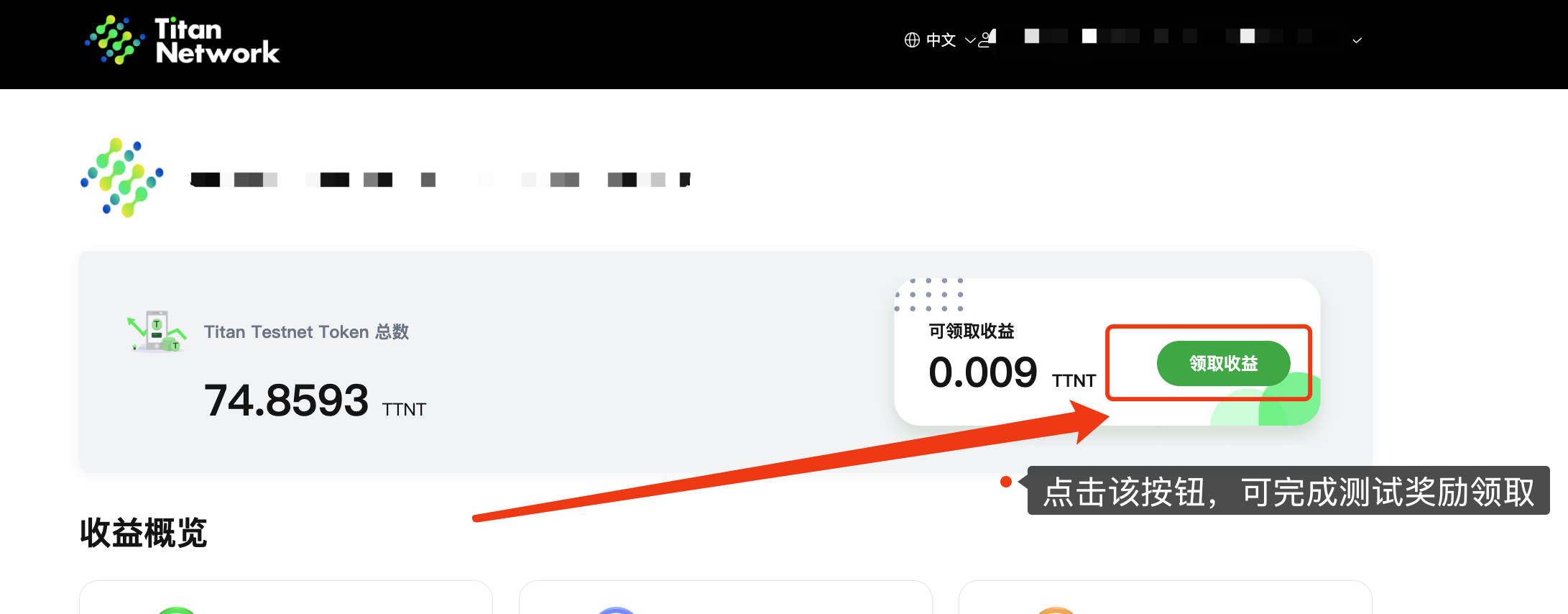
### 4.如何领取收益？

<figure><img src="/files/XETVFx0bpwNjfTdWbt3U" alt=""><figcaption><p>如果您已经完成质押操作并产生收益，可以通过点击此按钮领取赚取到的测试质押奖励。这样您就可以定期获取质押代币所带来的收益。</p></figcaption></figure>

*<mark style="color:red;">备注说明：请注意，该质押收益的奖励领取并非活动的空投奖励，仅为活动测试期间产生的收益。</mark>*

### 5.如何退回质押币？

<figure><img src="/files/B2MEIrK3h5GsQqH1hYXU" alt=""><figcaption></figcaption></figure>

<table><thead><tr><th width="208">名词</th><th>解析</th></tr></thead><tbody><tr><td>验证者名称</td><td>未来，验证者节点运营者将被允许自行设置名称和头像。这将使其能够更方便地向社区展示和辨认，提高节点的可见性和品牌认同感。</td></tr><tr><td>总质押量</td><td>总质押量表示在该验证者节点上当前质押的TTNT测试代币的总量。这反映了该节点获得的社区信任和支持程度。</td></tr><tr><td>预期年利率</td><td>预期年利率表示将代币质押在该验证者节点上的预计年化收益率。由于在网络测试节点阶段，该数据可能会有较大波动，这是正常情况。</td></tr><tr><td>投票权</td><td>投票权是指某一验证者节点上质押的TTNT代币数量与整个网络总质押量的占比。占比越高，该节点的投票权越高。这一比例决定了该节点在社区治理投票中的影响力。</td></tr><tr><td>解绑期</td><td>解绑期是指在解除质押时，为了网络安全考虑，需要等待的一段周期。在此期间，您的代币将暂时不可转移或使用，以确保网络的稳定性和安全性。</td></tr><tr><td>质押手续费</td><td>质押手续费是指每个验证者节点运营者收取的服务费用。这些费用用于覆盖节点运营成本，并作为节点运营者提供验证服务的报酬。</td></tr><tr><td>操作-质押</td><td>点击此按钮，您可以将代币质押在您心仪的验证者节点上。这一操作将使您的代币参与到网络的安全维护中，并有机会获得相应的收益。</td></tr><tr><td>操作-转移</td><td>点击此按钮，您可以将代币从A验证节点转移至B验证节点。这一操作使您能够灵活调整质押的验证节点，以优化收益或支持不同的节点运营者。</td></tr><tr><td></td><td></td></tr></tbody></table>


---

# Agent Instructions: Querying This Documentation

If you need additional information that is not directly available in this page, you can query the documentation dynamically by asking a question.

Perform an HTTP GET request on the current page URL with the `ask` query parameter:

```
GET https://help.titanapp.info/titan-network-zhong-wen/qu-kuai-lian-ce-shi/zai-titan-lian-shang-zhi-ya.md?ask=<question>
```

The question should be specific, self-contained, and written in natural language.
The response will contain a direct answer to the question and relevant excerpts and sources from the documentation.

Use this mechanism when the answer is not explicitly present in the current page, you need clarification or additional context, or you want to retrieve related documentation sections.